6. GStreamer Audio Pipelines
6.1. Introduction
The GStreamer pipeline framework on AM62DX enables real-time audio AI inference through two custom
plugins: tidspkernel and titvm. Together, they offload signal processing and neural network
inference to the C7x™ DSP while orchestrating the data flow from Linux. With GStreamer, you can:
Build Custom Pipelines — Compose audio processing chains using standard GStreamer elements
DSP Offload — Offload DSP signal chains (ex: STFT, ISTFT, and deinterleave/interleave) to the C7x™ DSP
TVM Inference — Run TVM-compiled AI models on the C7x™ NPU via the TVM runtime
Flexible I/O — Read from WAV files, live ALSA input, or other GStreamer sources
Direct Command-Line Control — Use gst-launch-1.0 to quickly test and prototype pipelines
6.2. Supported Pipelines
Pipeline |
Use Case |
Default Input |
Output |
|---|---|---|---|
Speech enhancement (GCRN) |
Noise reduction with spectral reconstruction |
|
Enhanced WAV file (playback or file) |
Audio classification (YAMNet) |
521-class audio event detection |
|
Top-k class names and scores (console) |
Audio classification (VGGish) |
10-class environmental sound classification |
|
Top-k class names and scores (console) |
6.3. Prerequisites
All runtime libraries, model artifacts, sample audio files, model daemon, and DSP firmware verification are pre-packaged in the AM62DX EdgeAI image. See Models, Artifacts and Setup for details.
To build the GStreamer plugins from source, the following host tools are required:
Tool |
Purpose |
|---|---|
meson / ninja |
Build system for GStreamer plugins |
ARM cross-compiler |
Required only for host-side cross-compilation |
pkg-config |
Dependency resolution during build |
6.3.1. Native Compilation & Installation on AM62D EVM
The plugins are pre-installed on the AM62DX EdgeAI image. If you need to rebuild them natively on the AM62D EVM, follow the steps below:
root@am62dxx-evm:~# cd /opt/edgeai-gst-plugins/
root@am62dxx-evm:/opt/edgeai-gst-plugins# export SOC=am62d
root@am62dxx-evm:/opt/edgeai-gst-plugins# meson setup build --prefix=/usr -Dpkg_config_path=pkgconfig \
  -Dtvm-plugins=enabled -Dstft-plugins=enabled \
  -Ddl-plugins=disabled -Denable-tidl=disabled
root@am62dxx-evm:/opt/edgeai-gst-plugins# ninja -C build
root@am62dxx-evm:/opt/edgeai-gst-plugins# ninja -C build install
root@am62dxx-evm:/opt/edgeai-gst-plugins# ldconfig
Note
The EdgeAI image includes pre-compiled plugins. These steps are only needed if you’re rebuilding the plugins from source with custom modifications.
6.3.2. Verifying the Installation
Execute the following command to verify the tidspkernel GStreamer plugin is installed:
root@am62dxx-evm:~# gst-inspect-1.0 tidspkernel
Factory Details:
Rank                     none (0)
Long-name                TI DSP Kernel Transform
Klass                    Transform/DSP
Description              Generic DSP kernel offload (STFT/ISTFT/Deinterleave/Interleave) via RPMsg-DMA
Author                   Pratham Deshmukh <p-deshmukh@ti.com>

Plugin Details:
Name                     ti
Description              GStreamer plugin for TI devices
Filename                 /usr/lib/gstreamer-1.0/libgstti.so
Version                  0.7.0
License                  Proprietary
Source module            GstTIOVX
Binary package           GstTIOVX source release
Origin URL               http://ti.com

GObject
+----GInitiallyUnowned
     +----GstObject
          +----GstElement
               +----GstBaseTransform
                    +----GstDspKernel
Execute the following command to verify the titvm GStreamer plugin is installed:
root@am62dxx-evm:~# gst-inspect-1.0 titvm
Factory Details:
Rank                     none (0)
Long-name                TI TVM Inference
Klass                    Transform/ML
Description              TVM inference on TI processors with C7x™ DSP acceleration
Author                   Pratham Deshmukh <p-deshmukh@ti.com>

Plugin Details:
Name                     ti
Description              GStreamer plugin for TI devices
Filename                 /usr/lib/gstreamer-1.0/libgstti.so
Version                  0.7.0
License                  Proprietary
Source module            GstTIOVX
Binary package           GstTIOVX source release
Origin URL               http://ti.com

GObject
+----GInitiallyUnowned
     +----GstObject
          +----GstElement
               +----GstBaseTransform
                    +----GstTiTvm
Note
Both commands must print the element details. If an element is missing, check that
/usr/lib/gstreamer-1.0/libgstti.so exists and that ldconfig has run.
6.4. GCRN based Speech Enhancement
Speech enhancement removes background noise from input audio source while keeping the speech intelligible — useful for voice calls, meeting recordings, hearables, and any product that captures speech in a noisy environment. This pipeline runs that speech enhancement full pipeline on the board: it reads a 16 kHz mono WAV file, converts it to the frequency domain on the DSP, runs the GCRN model on the result, and converts the enhanced spectrum back to audio which can be played or saved.
6.4.1. Speech Enhancement Pipeline using GCRN
Execute the following command to run the speech enhancement pipeline. The command writes /tmp/gst_enhanced.wav and plays the enhanced speech output through autoaudiosink. Connect headphones to J3/J4 as directed in AM62D EVM to listen to the enhanced speech.
INPUT=/usr/share/tvm_inference/input/input_audio.wav
MODEL=/usr/share/tvm_inference/artifacts/gcrn

gst-launch-1.0 -v \
  filesrc location=$INPUT ! wavparse ! \
  audio/x-raw,format=S16LE,rate=16000,channels=1 ! \
  tidspkernel name=stft msg-type=0x1020 model-path=$MODEL \
    hop-size=160 fft-size=320 window-frames=401 batch-size=64 \
    max-stream-samples=160480 ! \
  tidspkernel name=deinterleave msg-type=0x1040 interleave_direction=0 \
    model-path=$MODEL fft-size=320 window-frames=401 ! \
  titvm model-path=$MODEL ! \
  tidspkernel name=interleave msg-type=0x1040 interleave_direction=1 \
    model-path=$MODEL fft-size=320 window-frames=401 ! \
  tidspkernel name=istft msg-type=0x1030 model-path=$MODEL \
    hop-size=160 fft-size=320 window-frames=401 batch-size=64 \
    max-stream-samples=160480 ! \
  audio/x-raw,format=S16LE,rate=16000,channels=1 ! \
  tee name=t \
  t. ! queue ! wavenc ! filesink location=/tmp/gst_enhanced.wav \
  t. ! queue ! audioconvert ! audioresample ! autoaudiosink
To run without audio playback, remove the tee branch and keep only the file output:
gst-launch-1.0 -v \
  filesrc location=$INPUT ! wavparse ! \
  audio/x-raw,format=S16LE,rate=16000,channels=1 ! \
  tidspkernel name=stft msg-type=0x1020 model-path=$MODEL \
    hop-size=160 fft-size=320 window-frames=401 batch-size=64 \
    max-stream-samples=160480 ! \
  tidspkernel name=deinterleave msg-type=0x1040 interleave_direction=0 \
    model-path=$MODEL fft-size=320 window-frames=401 ! \
  titvm model-path=$MODEL ! \
  tidspkernel name=interleave msg-type=0x1040 interleave_direction=1 \
    model-path=$MODEL fft-size=320 window-frames=401 ! \
  tidspkernel name=istft msg-type=0x1030 model-path=$MODEL \
    hop-size=160 fft-size=320 window-frames=401 batch-size=64 \
    max-stream-samples=160480 ! \
  audio/x-raw,format=S16LE,rate=16000,channels=1 ! \
  wavenc ! filesink location=/tmp/gst_enhanced.wav
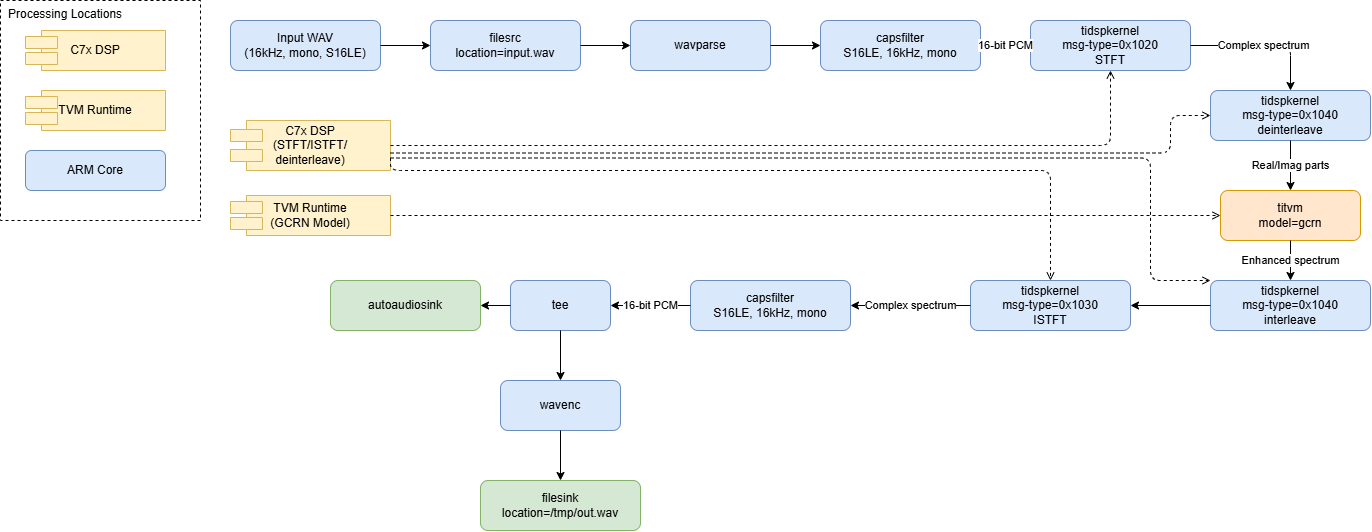
Fig. 6.1 GStreamer data-flow for GCRN speech enhancement: input WAV → STFT → GCRN model inference → ISTFT → output WAV + playback
6.5. YAMNet & VGGish based Audio Classification
Audio classification identifies what sound is present in input audio source — a siren, glass breaking, a dog barking, a machine running — rather than transcribing speech. That makes it useful for acoustic event detection, environmental and industrial sound monitoring, and safety or anomaly alerts triggered by sound rather than video. This pipeline runs YAMNet or VGGish on a 16 kHz mono WAV file on the DSP, and prints the top-k predicted classes and their scores for each analysis window to the console as the pipeline runs.
YAMNet and VGGish differ mainly in scope: YAMNet recognizes 521 general sound classes, while VGGish is a smaller, 10-class model. Pick YAMNet for broad coverage, or VGGish when you only need to distinguish a small, fixed set of sounds and want a lighter model.
6.5.1. Audio Classification Pipeline using YAMNet
Execute the following command to run GStreamer based YAMNet audio classification pipeline:
gst-launch-1.0 -v filesrc location=/usr/share/tvm_inference/input/urbansound_16k.wav ! \
  wavparse ! audio/x-raw,format=S16LE,rate=16000,channels=1 ! \
  tidspkernel name=stft msg-type=0x1020 \
    model-path=/usr/share/tvm_inference/artifacts/yamnet \
    hop-size=160 window-frames=96 batch-size=64 ! \
  titvm model-path=/usr/share/tvm_inference/artifacts/yamnet \
    class-map-path=/usr/share/tvm_inference/labels/yamnet_label_list.txt \
    top-k=3 ! \
  fakesink
6.5.1.1. YAMNet Command Output
Setting pipeline to PAUSED ...
[TVM] Live top-3 prediction printing enabled (521 classes from /usr/share/tvm_inference/labels/yamnet_label_list.txt)
eptdev = rpmsg-char-8-1455
Created endpt device rpmsg-char-8-1455, fd = 7 port = 1027
Pipeline is PREROLLING ...
/GstPipeline:pipeline0/GstWavParse:wavparse0.GstPad:src: caps = audio/x-raw, format=(string)S16LE, layout=(string)interleaved, channels=(int)1, rate=(int)16000
/GstPipeline:pipeline0/GstCapsFilter:capsfilter0.GstPad:src: caps = audio/x-raw, format=(string)S16LE, layout=(string)interleaved, channels=(int)1, rate=(int)16000
/GstPipeline:pipeline0/GstDspKernel:stft.GstPad:src: caps = application/octet-stream
/GstPipeline:pipeline0/GstTiTvm:titvm0.GstPad:src: caps = application/octet-stream
/GstPipeline:pipeline0/GstFakeSink:fakesink0.GstPad:sink: caps = application/octet-stream
/GstPipeline:pipeline0/GstTiTvm:titvm0.GstPad:sink: caps = application/octet-stream
/GstPipeline:pipeline0/GstDspKernel:stft.GstPad:sink: caps = audio/x-raw, format=(string)S16LE, layout=(string)interleaved, channels=(int)1, rate=(int)16000
/GstPipeline:pipeline0/GstCapsFilter:capsfilter0.GstPad:sink: caps = audio/x-raw, format=(string)S16LE, layout=(string)interleaved, channels=(int)1, rate=(int)16000
Pipeline is PREROLLED ...
Setting pipeline to PLAYING ...
Redistribute latency...
New clock: GstSystemClock
Top-3 predictions for window 1:
   1. Speech: 0.532749
   2. Music: -4.261989
   3. Narration, monologue: -4.794737
Top-3 predictions for window 2:
   1. Music: -1.598246
   2. Speech: -2.663743
   3. Television: -3.729240
Top-3 predictions for window 3:
   1. Music: -1.065497
   2. Animal: -2.663743
   3. Speech: -3.196491
Top-3 predictions for window 4:
   1. Speech: -1.598246
   2. Music: -1.598246
   3. Country: -5.860234
Top-3 predictions for window 5:
   1. Speech: -2.130994
   2. Music: -3.196491
   3. Silence: -4.261989
Top-3 predictions for window 6:
   1. Silence: 14.916960
   2. Speech: -11.187720
   3. Inside, small room: -15.982457
Top-3 predictions for window 7:
   1. Silence: 12.253218
   2. Speech: -10.122223
   3. Inside, small room: -15.449709
Top-3 predictions for window 8:
   1. Silence: 15.449709
   2. Speech: -10.654972
   3. Inside, small room: -14.916960
Got EOS from element "pipeline0".
Execution ended after 0:00:00.302017695
Setting pipeline to NULL ...
Freeing pipeline ...``
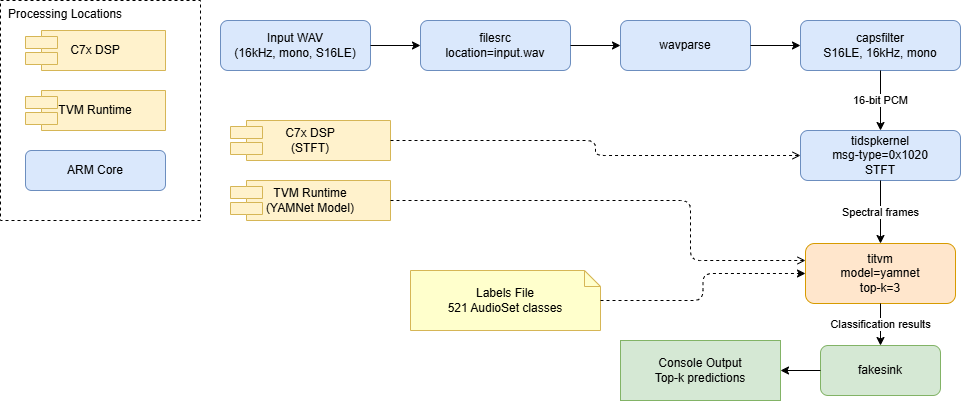
Fig. 6.2 GStreamer data-flow for YAMNet based audio classification: input WAV → STFT → YAMNet model inference → console output
6.5.2. Audio Classification Pipeline using VGGish
Execute the following command to run GStreamer based VGGish audio classification pipeline:
gst-launch-1.0 -v filesrc location=/usr/share/tvm_inference/input/urbansound_16k.wav ! \
  wavparse ! audio/x-raw,format=S16LE,rate=16000,channels=1 ! \
  tidspkernel name=stft msg-type=0x1020 \
    model-path=/usr/share/tvm_inference/artifacts/vggish \
    hop-size=512 window-frames=126 batch-size=64 ! \
  titvm model-path=/usr/share/tvm_inference/artifacts/vggish \
    class-map-path=/usr/share/tvm_inference/labels/vggish_label_list.txt \
    top-k=3 ! \
  fakesink
6.5.2.1. VGGish Command Output
Setting pipeline to PAUSED ...
[TVM] Live top-3 prediction printing enabled (10 classes from /usr/share/tvm_inference/labels/vggish_label_list.txt)
eptdev = rpmsg-char-8-1295
Created endpt device rpmsg-char-8-1295, fd = 7 port = 1027
Pipeline is PREROLLING ...
/GstPipeline:pipeline0/GstWavParse:wavparse0.GstPad:src: caps = audio/x-raw, format=(string)S16LE, layout=(string)interleaved, channels=(int)1, rate=(int)16000
/GstPipeline:pipeline0/GstCapsFilter:capsfilter0.GstPad:src: caps = audio/x-raw, format=(string)S16LE, layout=(string)interleaved, channels=(int)1, rate=(int)16000
/GstPipeline:pipeline0/GstDspKernel:stft.GstPad:src: caps = application/octet-stream
/GstPipeline:pipeline0/GstTiTvm:titvm0.GstPad:src: caps = application/octet-stream
/GstPipeline:pipeline0/GstFakeSink:fakesink0.GstPad:sink: caps = application/octet-stream
/GstPipeline:pipeline0/GstTiTvm:titvm0.GstPad:sink: caps = application/octet-stream
/GstPipeline:pipeline0/GstDspKernel:stft.GstPad:sink: caps = audio/x-raw, format=(string)S16LE, layout=(string)interleaved, channels=(int)1, rate=(int)16000
/GstPipeline:pipeline0/GstCapsFilter:capsfilter0.GstPad:sink: caps = audio/x-raw, format=(string)S16LE, layout=(string)interleaved, channels=(int)1, rate=(int)16000
Pipeline is PREROLLED ...
Setting pipeline to PLAYING ...
Redistribute latency...
New clock: GstSystemClock
Top-3 predictions for window 1:
   1. Street music: 8.411190
   2. Children playing: 8.206039
   3. Air conditioner: -4.513321
Got EOS from element "pipeline0".
Execution ended after 0:00:00.082239915
Setting pipeline to NULL ...
Freeing pipeline ...
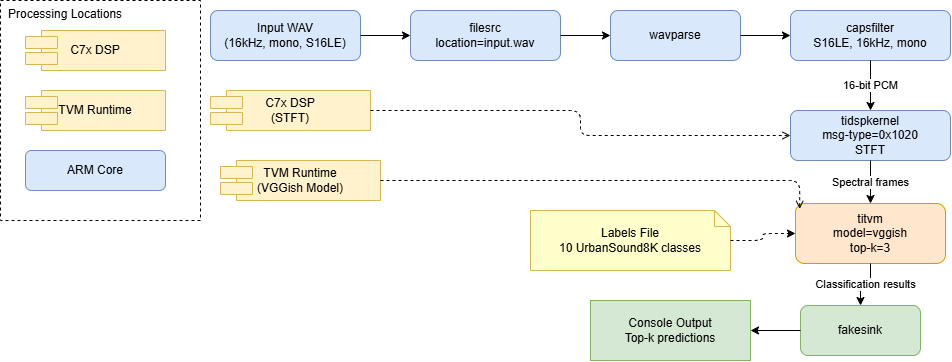
Fig. 6.3 GStreamer data-flow for VGGish based audio classification: input WAV → STFT → VGGish model inference → console output
6.6. Troubleshooting
Issue |
Resolution |
|---|---|
|
Set |
|
Increase |
|
The input is longer than |
|
Start the daemon, or accept the in-process load time. |
|
The DSP firmware is not running. Check |
|
Not enough contiguous memory for the model. Reboot and retry, then check |
|
The DSP firmware does not match the plugin. Check the DSP firmware version. |
|
Run again with |
|
Check the path, and that the file is readable. |
Banner prints but no predictions appear |
Run with |
Predictions do not match the expected labels |
Check that the model and label file are a pair: YAMNet with |
|
Use a value from 1 to 521. |
Long wait before banner prints |
|